
Author: Admin

  • Browse Safer on Windows: Practical Privacy Gains with iTop VPN

    Browse Safer on Windows: Practical Privacy Gains with iTop VPN

    Most browsing risks don’t feel dramatic in the moment. You open a link, log in to an account, join a public Wi‑Fi, or search for something personal. That normal activity creates a trail: your IP address, your DNS requests, and a lot of metadata that can be collected, blocked, or abused.

    A VPN is one of the simplest tools for tightening up everyday privacy. iTop VPN for Windows focuses on encrypted traffic, IP masking, and a set of add-ons that reduce tracking and exposure during routine browsing.​

    What is iTop VPN?

    iTop VPN for Windows is a VPN app that routes your internet traffic through VPN servers while applying AES-256 encryption and a no‑log policy.​

    The Windows version is presented as a free VPN option that can connect to free servers without login, with support for Windows 11/10/8/7 plus Windows on ARM.​

    It also highlights a large server pool, 3200+ servers across 100+ locations, so you can switch regions quickly when a site or network blocks access.​

    Benefits for safer, more private browsing

    Less exposure of your real IP address

    Recall how many sites use IP-based tracking, rate limits, and geo rules. iTop VPN assigns a new IP address after you connect to a server, which helps hide your original public IP during browsing sessions.​

    If you prefer a consistent identity for certain activities, iTop VPN also offers dedicated IP options in the US, UK, Canada, and Germany so you can connect with the same exclusive IP each time.​

    Encrypted traffic on public Wi‑Fi

    Public Wifi is convenient and also a common place for snooping and interception. iTop VPN states it safeguards your data with encryption to help prevent interception by ISPs, government monitoring, and third-party advertisers, which is useful when browsing on shared networks.​

    Fewer tracking surfaces while you browse

    Vpn

    Two features work well together for day-to-day browsing hygiene:

    • Browser Anti‑Tracking: iTop VPN can automatically clean browser traces and supports major browsers such as Chrome, Firefox, Edge, Safari, IE, and Waterfox.​
    • Ads Block: it includes an ad-blocking option aimed at blocking malicious ads and cutting pop-ups.​

    This combination is useful when browsing content-heavy sites that are packed with trackers, aggressive ads, and risky redirects.​

    Reduced leak risk during connection drops

    A VPN is only helpful while it’s connected. If the tunnel drops for a moment, traffic can jump back to the regular connection. iTop VPN includes a Kill Switch that automatically stops all internet traffic if the VPN connection switches off, then resumes when the VPN reconnects.​

    That feature is a practical guardrail for people who browse on unstable Wi‑Fi or move between networks during the day.​

    Better protection from DNS and WebRTC leaks

    Even with a VPN, browser-level leaks can expose identifying details.

    • DNS Leak Protection: iTop VPN states it prevents system DNS settings from being modified and reduces hijacking or spam risks.​
    • WebRTC Leak Protection: it targets a known browser vulnerability (called out for Firefox and Chrome) that may leak public and private IP addresses.​

    For privacy-minded users, these are useful because they focus on leak paths that many people never check.​

    Broader protocol options for restrictive networks

    Some schools, offices, and networks block common VPN traffic. iTop VPN includes three VPN protocols, TCP, UDP, and HTTPS, so you can pick a mode that works better for the network you’re on.​

    HTTPS mode can also be helpful on networks that inspect traffic closely, since it resembles regular secure web traffic.​

    Split tunneling to keep local services smooth

    Split tunneling routes some app traffic through the VPN while other apps use the local connection.​

    That can be handy if you want private browsing in a browser while keeping another app (like a local work tool) on the normal route.​

    Privacy posture backed by a No‑Log Policy

    iTop VPN states it sticks to a No‑Log Policy and will not track or record profile information.​

    For users who are serious about privacy, that statement matters because logs can turn a VPN into another data collector.​

    Extra account safety features

    Browsing privacy is tied to account security, since most browsing ends in logins.

    iTop VPN includes Dark Web Monitor, which scans dark web sites for leaked information and alerts you if your email, phone, or other information is detected.​

    It also includes a Password Generator that creates strong passwords with uppercase, lowercase, digits, and symbols, and it can store password history with remarks.​

    IPv6 support on compatible servers

    The Windows page mentions IPv6 servers and states that giving IPv6 higher priority allows Windows devices to connect to servers with IPv6 protocol while maintaining online security.​

    If you browse on networks that use IPv6 heavily, this option can help keep your VPN setup aligned with that environment.​

    Fast browsing without bandwidth caps

    If a VPN slows browsing too much, people stop using it. iTop VPN states it does not limit bandwidth speed and works to mitigate the influence of ISP throttling.​

    The product page also highlights unlimited data and bandwidth, with a focus on fast connection for streaming and gaming as well as browsing.​

    How to use iTop VPN for safer browsing (Windows)

    1. Download and install Go to the iTop official page and click the Free Download button: 

    2. Connect to a VPN server

    Vpn

    The setup steps on the page describe installing, launching, then connecting to a free VPN server without login.​

    3. Turn on privacy options that match your habits
    For everyday browsing, consider enabling Kill Switch, Ads Block, DNS leak protection, WebRTC leak protection, and browser trace cleanup.​

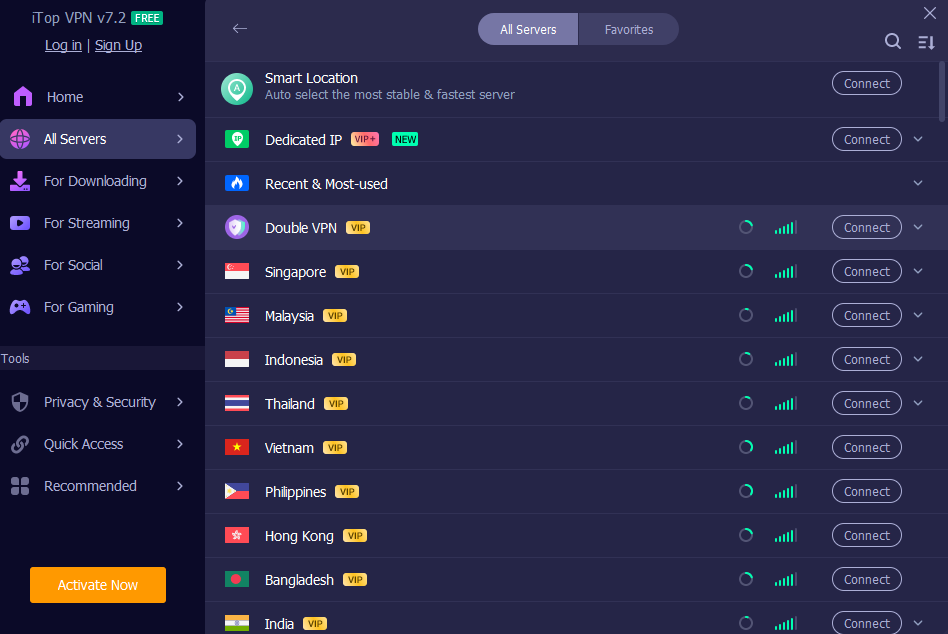
    4. Pick an IP style that fits the session
    Vpn

    Use the best server IP (fastest/closest) for regular browsing, a dedicated IP for consistency, or the smart location option for lower traceability.​

    5. Set it to start with Windows
    The Windows page notes a launch-on-startup option, so traffic is encrypted from the beginning of a session.​

    Conclusion

    Safe browsing is mostly about habits: encrypt your traffic, reduce leaks, cut trackers, and keep credentials strong. iTop VPN for Windows bundles those ideas into one app, encryption, server coverage, leak protection, Kill Switch, anti-tracking cleanup, ad blocking, dark web monitoring, and password generation.​


  • AI Tools That Replace Traditional Game Prototyping

    For decades, the path from a game idea to a playable test has been a bottleneck. Before a designer could verify if a mechanic was fun or if a story beat landed correctly, they had to build it. This required technical coding skills, time, and resources.

    Game prototyping is the process of creating a preliminary version of a game to test a concept or process. It is the “sketching” phase of game development. The goal isn’t to build the final product, but to answer critical questions: Is the core loop engaging? Do the controls feel responsive? Is the narrative pacing too slow?

    Traditionally, answering these questions meant spending weeks writing code or creating physical assets. If the idea turned out to be flawed, that time was lost. This risk often discouraged beginners and indie developers from experimenting with bold or unusual concepts.

    However, a shift is occurring in how early-stage concepts are validated. New tools driven by artificial intelligence are allowing creators to bypass much of the technical setup required to test an idea.

    What was Traditional Game Prototyping Before AI


    To understand the shift, it is helpful to look at how prototyping has historically functioned. The traditional workflow is effective but resource-intensive.

    Wireframes and Design Docs

    The first step usually involves static documentation. Designers create wireframes, simple sketches of user interfaces or level layouts. While helpful for planning, a drawing on a whiteboard cannot replicate the feeling of playing the game. It is difficult to judge the timing of a jump or the satisfaction of a combat encounter from a static image.

    Paper Prototypes

    For strategy or puzzle games, developers often use paper prototyping. This involves using index cards, dice, and board game pieces to simulate game logic. While this is excellent for testing rules and math, it fails to capture the immersion, visual feedback, or real-time reaction speeds of a video game.

    Playable “Grey Box” Builds

    The most accurate prototype is a digital “grey box” build. This is a rough version of the game using untextured blocks (hence “grey box”) to represent characters and environments. Building this requires a game engine and programming knowledge. Even a simple prototype might require setting up physics engines, writing scripts for character movement, and debugging code errors.

    The Feedback Loop Problem

    The core issue with these methods is the speed of the feedback loop. If a developer builds a prototype and realizes a mechanic isn’t fun, they must rewrite the code to change it. This cycle of build-test-fix is slow. For a solo developer or a small team, spending two weeks building a prototype only to scrap it is a high cost.

    How AI Tools Replace Early Prototyping

    Modern AI Game generation tool addressing these friction points by automating the technical implementation of ideas into playable online games. The goal of these tools is not to generate a final, polished game, but to get to the “testing” phase instantly.

    Make Your Own Games From Idea to Playable & Shareable Game

    The primary change is the removal of the syntax barrier. In traditional development, if you want a character to jump, you must write the correct syntax in a language like C# or C++. With AI-assisted prototyping, the input is natural language. A creator can describe the rules, “the player jumps higher if they hold the button,” and the tool interprets this logic into a playable format. This allows immediate validation of a mechanic’s “feel”.

    Visual Logic, instead of Code help you in making Games.

    Many modern game prototyping tools use node-based or visual logic systems generated from user prompts, like Astrocade, a platform for beginners to learn prompt-based game generation, and publish them on online platforms, analyzing game stats like how much time the game has been played. Instead of writing lines of code, the AI sets up the relationships between objects. 

    For example, if a user wants a door to open when a key is collected, the tool establishes that logical connection. This allows creators to see the logic structure without needing to understand the underlying programming language. Real-world example of Jump Cat, a prompt to playable mechanics test (Cat jump timing, obstacle avoidance, basic scoring).

    Story-Driven Testing To Play with Friends Online

    For narrative games, prototyping used to require writing branching dialogue trees in spreadsheets and then manually inputting them into an engine. AI text generation tools allow creators to test narrative flow dynamically. A developer can outline a scenario and character motivations, and the tool can generate a playable text adventure. This helps specific narrative beats and dialogue pacing be tested before a human writer drafts the final script.

    Instant Iteration With Republishing of Game along with Advancements

    The most significant advantage is the speed of iteration. If a game rule feels unbalanced, the creator does not need to hunt through lines of code to find the variable. They can simply restate the rule by reediting the prompt. This fluidity encourages experimentation. A developer can test five different variations of a gameplay mechanic in the time it traditionally took to program just one.

    What Creators Can Build Faster

    While AI tools are not yet capable of building complex, 3D open-world simulations from a single prompt, they excel at specific genres suitable for early validation.

    Story-Based Games

    Interactive fiction, visual novels, and text adventures are ideal for this workflow because the “prototype” is mainly about testing choices, pacing, and consequence design, not building complex systems. The AI can handle branching logic (flags, inventory, relationship variables), so creators can iterate on story beats and decision points quickly while keeping the focus on writing and player experience.

    To see the same rapid-prototype mindset applied to moment-to-moment gameplay feel (pace, risk/reward, obstacle timing) instead of dialogue branches, try a lightweight playable.

    Puzzle Concepts

    Logic puzzles and escape room mechanics rely heavily on specific rules. AI tools can quickly generate scenarios where Item A interacts with Lock B. This allows designers to test the difficulty curve of their puzzles without needing to model 3D assets.

    Educational Games

    Scenario-based learning often follows a strict structure of “Question -> Answer -> Feedback.” This structure is easily automated. Educators and instructional designers can prototype training simulations or historical reenactments rapidly, testing the educational efficacy before investing in expensive graphics.

    Simple Multiplayer Ideas

    Turn-based multiplayer concepts, such as card battlers or strategy games, are largely defined by their rulesets. AI prototyping can simulate these turns, allowing a designer to play against a computer opponent that follows the generated rules. This helps identify “broken” strategies or overpowered units early in the process.

    Step-by-Step Modern Prototyping Flow

    For a beginner looking to use these tools, the workflow looks different from traditional game development. It emphasizes structure and logic over coding syntax.

    1. Concept Planning: The process still starts with a clear idea. The creator must be able to articulate the goal of the game and the player’s role.
    2. Story and Logic Structure: Instead of drawing a map, the creator outlines the progression. What happens first? What is the winning condition? What causes a “game over”?
    3. Defining Core Mechanics: The creator inputs the rules. For example: “The player has three health points. Touching a spike removes one point.”
    4. Basic Interaction Testing: The tool generates a playable interface. The creator interacts with it to see if the rules trigger correctly.
    5. Feedback and Refinement: If the game is too easy or the logic breaks, the creator refines the prompt or adjusts the generated settings directly.

    Benefits for Beginners and Indie Teams

    Adopting No Code Game maker workflow offers distinct advantages for small teams and solo creators.

    Lower Learning Curve

    The barrier to entry for game design has traditionally been programming. By removing the need to learn complex syntax immediately, AI prototyping opens the field to writers, artists, and designers who may have great ideas but lack coding skills.

    Faster Validation

    The “fail fast” philosophy is important in design. Finding out an idea isn’t fun after one hour of work is a success. Finding out after three months of coding is a failure of resource management. These tools allow for rapid discarding of bad ideas.

    Reduced Development Cost

    Time is the most expensive resource for indie developers. By shortening the pre-production phase, developers can save their budget for the actual production phase, hiring artists, composers, and programmers when they know exactly what needs to be built.

    More Focus on Creativity

    When the mental load of debugging code is removed, the brain is free to focus on design. Creators can spend their energy thinking about player psychology, narrative depth, and fun factor, rather than worrying about why a specific animation isn’t triggering.

    Limitations and Reality Check

    It is vital to maintain realistic expectations. These tools are powerful, but they are not magic wands that produce finished products.

    • Not a Replacement for Full Development: A prototype is not a commercial product. AI tools can validate an idea, but building a polished, optimized, and bug-free game for release still requires professional game engines and development skills.
    • Creative Control Still Matters: AI can generate generic content easily. Unique, compelling, and innovative games still require a human’s creative vision to direct the tool.
    • Testing and Balance: An AI can ensure the game runs, but it cannot tell you if the game is fun. Human playtesting remains an essential part of the process to balance difficulty and engagement.

    Summary

    The game prototyping is shifting from technical construction to logical description. AI-driven tools provide a way for beginners and indie creators to visualize and test their ideas without the heavy upfront investment of learning to code.

    By allowing for rapid iteration and lowering the technical barrier, these tools enable more people to participate in game design. The best way to understand this shift is not to read about it, but to try it. Start with a simple idea, define the rules, and see how quickly a concept can become a playable reality.

  • PGWP Processing Time 2026: What You Need to Know

    PGWP Processing Time 2026: What You Need to Know

    For international graduates in Canada, the Post-Graduation Work Permit (PGWP) is not just a springboard into learning valuable professional skills, but also quickens one’s career ascent and even serves as the first step toward permanent residency. 

    But the most vexing part of this journey for many people is not actually the requirements they have to meet to apply for a PGWP, but waiting for their application to be processed. In 2026, further evaluation of Canadian immigration officials’ application process increased application times and reduced predictability, leaving PGWP applicants with greater uncertainty than they anticipated. 

    Everyone’s best attempt at response is to submit online requests, but many, including pets, remain stuck in the on-hold queue for months on end. Understanding current trends, seasonal effects, tactics for applying, and official IRCC updates can help you choose your own shortcuts, avoid delays, and keep your work permit valid while waiting. This all-inclusive guide covers every aspect of processing times for 2026 Pgwp processing time based on the most recent data and what other applicants have experienced.

    Current PGWP Processing Time Trends

    Until February 2026, the length of time it will take to process a PGWP in Canada appears from recent history to be significantly longer than normal. Effective applications made on the Internet from within Canada usually require between 80 and 233 days (around 3-8 months), depending upon IRCC workloads and intake periods, particularly busy times after spring and fall graduations. 

    Paper applications are slower and would not normally be recommended as a result of manual processing delays. Whilst some sources suggest a conceivable “target” as part of future reform that would involve shorter processing times, reality right now is high demand and backlog-clearing. Many applicants wait for their decisions 5–8 months or longer under these conditions. Currently, those ranges keep changing weekly: applicants should, as such, always consult the latest updates at IRCC’s website.

    What Affects Your PGWP Processing Time?

    Several factors influence how long IRCC takes to process your PGWP:

    1. Method of Application — Online applications tend to be faster than paper ones. 
    2. Seasonal Volume — Peak graduation seasons (spring and summer) bring larger application volumes, extending wait times. 
    3. Completeness — Missing documents or unclear scans can delay processing. 
    4. Biometrics & Verification — IRCC may require additional checks before final decisions. 
    5. Backlogs & IRCC Capacity — Current backlogs and staffing affect timelines significantly. Applicants often report IRCC taking longer than official averages.
      Maintaining accurate paperwork and submitting early in the year may help reduce waiting times. 

    How to Track Your PGWP Application

    Once your application for the PGWP is filed, within a few days, you will receive an Acknowledgement of Receipt (AOR). This document will also contain the application number, which you must have in order to monitor its progress through your MyCIC account. The IRCC tool gives a midpoint, the average time people are waiting to come to a decision. But it is not a guarantee that you will receive a decision within this range; individual experiences vary widely.

    Working While Your PGWP Is Pending

    One great advantage of applying for a PGWP in Canada is that you can usually keep working full-time while your application is being processed, provided you submit it before your study permit expires. This is called implied status, and lets you continue working within the terms of your previous license until a decision is reached. 

    In many cases, IRCC also issues a WP-EXT letter (Work Permit Extension) immediately thereafter, which can be very helpful when employers request formal documentation. It is crucial to keep proof of your AOR and implied status paperwork at hand in case employers or officials request verification.

    Regional and Sectoral Backlogs Affecting PGWP

    The national IRCC averages around 80-233 days for processing time, but it’s important to bear in mind that certain applications may take longer, especially when there is heavy demand from a province or industry and IRCC workloads are high. 

    Newcomers need to be patient and start early so they can work their way smoothly through these first few years of adjustment, making decisions about employer and employment, along with life in general. In short, the delay means that many aspects of life and planning are affected. Those backlogs may influence whether one can find a job, employers’ or individuals’ decisions and personal living arrangements are all taken into account by them. 

    The backlog of a backlog: For example, Nova Scotia, that’s over the last several years seen its lowly-paid seasonal and temporary farm labour become a growth industry with crops made ready for harvest by cheap Mexican labour. Davidson and MacAskill (2007) state that certain occupations and industries now have significant worker shortages in the province. Such by domestic workers is something which no longer does us credit as Canadians: in fact, we should reflect upon it.

    Tips to Reduce Delays and Avoid Mistakes

    Delays can be reduced if you start to get yourself ready. Your PGWP application should be completed and corrected with good-quality scans of the appropriate documents, your final transcript, program completion letter, passport pages, etc. Applying online within Canada is faster than using paper forms. This abbreviation ensures international students get the benefit of processing times for their applications. 

    Federal Wait hours are hardly ever necessary. From the moment you file until approximately the same day, comprehensive inquiries from IRCC arrive with action items that stop your admissibility to Canada. What steps can you take to prevent being held up when you apply for a work permit E.g.

    FAQs

    How long is the typical PGWP processing time in 2026?

    Most PGWP applications take between 80 and 233 days (about 3–8 months), though some wait longer depending on volume.

    Does applying online help speed up my PGWP?

    Yes, online applications are generally processed faster and more efficiently than paper ones.

    Can I work while my PGWP is processing?

    Yes, if you applied before your study permit expired, you can usually work on implied status while waiting for a decision.

    Why are processing times often?

    Times change due to application volumes, IRCC capacity, peak seasons, and global demand for post‑graduation work permits.

    Conclusion

    Understanding Processing Times for PGWP in 2026 is essential for those international students who are looking to settle in Canada while working. Right now, the temporality at Immigration, Refugees and Citizenship Canada lasts for several months, often from 80 to 200 days. Both causes are also contributed to by large numbers of applications arriving each time (Canadians say this is ‘seasonal peaks’) and regular attempts on the part of Canadian authorities to sort backlogs. 

    In 2026, applicants who submit online and keep an eye on their status can trim delays and stay in line with legal employment through implied authorisation. Official updates from the IRCC keep expectations reasonable, place things before people in a timely manner and give beneficial results. After all, if the immigration system keeps changing, forward-looking effort and steadiness of mind could prove to be the best way out for students who hope 2026 will see them successfully gain a PGWP in Canada or even beyond.

  • Lupe Gidley: A Quiet Life Lived With Purpose

    Lupe Gidley: A Quiet Life Lived With Purpose

    Lupe Gidley is not a name that floods headlines or dominates search trends, yet her story quietly pulls people in. There is something compelling about individuals who choose meaning over noise, and that is exactly where this narrative begins. Within the first few conversations people have about her, curiosity naturally grows. Who is she beyond surface-level mentions, and why does her life resonate with those who look closer? This article explores Lupe Gidley through experience, context, and grounded understanding rather than speculation or hype.

    Understanding the Background of Lupe Gidley

    Lupe Gidley’s background reflects a life shaped more by intention than attention. Rather than chasing visibility, she appears to have prioritized personal grounding, family values, and consistency. People often underestimate how much these quiet foundations matter, yet they influence every visible choice later on. Her early environment played a role in shaping calm confidence rather than outward ambition.

    Growing up away from constant public scrutiny allowed space for self-definition. That distance matters because it creates room for identity without performance. Many who later step near public life struggle with that balance, but her background suggests a steadier transition. It also explains why she seems comfortable staying out of unnecessary focus.

    Background stories like hers remind us that not every meaningful life begins with grand narratives. Some start with simple routines, strong relationships, and patience. That grounded start becomes a quiet strength later, especially when life intersects with more visible worlds.

    Will You Check This Article: HHKTHK Explained: Meaning, Use, and Digital Context

    Life Choices That Reflect Personal Values

    One of the most telling aspects of Lupe Gidley’s story is how her decisions consistently align with personal values. Instead of following trends or expectations, she seems to choose paths that protect balance and emotional clarity. That approach is rare in a culture that rewards constant motion and visibility.

    Her life choices suggest careful prioritization. Family, stability, and personal well-being appear to rank higher than external recognition. These priorities matter because they shape long-term fulfillment, not just short-term wins. People often realize this too late, which makes her example quietly instructive.

    When you observe such choices over time, a pattern emerges. It is not about avoidance or fear but about clarity. Knowing what matters most makes decision-making simpler, even when options multiply.

    Relationship With Public Attention

    Lupe Gidley’s relationship with public attention seems deliberate and measured. She is known largely through association rather than personal self-promotion, which changes how people perceive her. This distance from the spotlight often sparks curiosity, yet it also protects authenticity.

    Public attention can distort identity if not handled carefully. By maintaining boundaries, she avoids becoming defined by external narratives. That restraint matters because it preserves agency. People who control their exposure often maintain stronger self-awareness and emotional balance.

    This approach also challenges modern assumptions. Visibility is not always power. Sometimes restraint carries more strength, especially when personal life and public perception intersect.

    The Importance of Privacy in Her Life

    Privacy appears to be a central value in Lupe Gidley’s life. In an era where oversharing is normalized, choosing discretion becomes an act of self-respect. This choice protects not only personal peace but also the people around her.

    Maintaining privacy allows relationships to exist without performance. It creates space for genuine connection rather than curated moments. That distinction matters deeply, especially for those connected to public figures or visible industries.

    Her example highlights something many overlook. Privacy is not secrecy. It is intentional sharing, and that balance often leads to healthier emotional outcomes and longer-lasting relationships.

    How She Navigates Family and Identity

    Family plays a significant role in shaping Lupe Gidley’s identity. Rather than being overshadowed by others, she appears to integrate her roles naturally. This balance is difficult but essential when personal and public worlds overlap.

    Navigating family life with intention requires emotional intelligence. It means knowing when to step forward and when to remain grounded. Her approach suggests respect for shared identity without losing individuality.

    This matters because identity rooted in relationships tends to be more resilient. When life changes, those foundations provide stability instead of pressure.

    Public Curiosity Versus Real Life

    Public curiosity around Lupe Gidley often contrasts sharply with the simplicity of her real life. People tend to project narratives onto figures they know little about. This gap between assumption and reality can be wide.

    What stands out is how little she seems affected by speculation. That emotional distance suggests strong internal grounding. When you are secure in your life, outside noise loses power.

    This dynamic reminds readers that public perception rarely tells the full story. Real life happens quietly, away from commentary and assumptions.

    Why Her Story Resonates With Many

    Lupe Gidley resonates with people precisely because her life feels relatable. She represents a counterpoint to constant visibility and curated success. Many see in her a reminder that fulfillment does not require performance.

    Her story matters because it reflects choices many wish they felt free to make. Slowing down, valuing privacy, and choosing meaning over recognition are deeply human desires.

    That resonance grows not from dramatic events but from consistency. Quiet lives often leave lasting impressions because they reflect truths people recognize in themselves.

    Conclusion

    Lupe Gidley’s life offers a reminder that significance does not always announce itself loudly. Through grounded choices, respect for privacy, and clear values, she demonstrates another way to live well. Her story matters because it reflects intention over impulse and balance over noise. In a world obsessed with attention, her quiet presence stands out. Lupe Gidley shows that a meaningful life can unfold without constant explanation or display.

    Read More: dollartimes.co.uk 

  • List Crowlers Explained for Craft Beer Lovers

    List Crowlers Explained for Craft Beer Lovers

    Craft beer has a way of pulling people into its details, and list crowlers are one of those details that quietly changed how many of us enjoy fresh beer. If you have ever walked into a taproom wanting something to take home but did not want bottles or cans, this concept probably crossed your path. Understanding list crowlers helps you appreciate freshness, portability, and how modern breweries think about serving beer beyond the tap.

    Understanding What List Crowlers Really Are

    List crowlers are large, sealed containers filled directly from a brewery tap, designed to preserve beer flavor outside the taproom. They are often made of aluminum and sealed on demand, which helps keep oxygen out. This process matters because oxygen dulls hop aroma and freshness. Many drinkers first encounter them when a favorite seasonal beer is unavailable in packaged form.

    The appeal goes beyond convenience. These containers allow breweries to offer limited or experimental batches without committing to full-scale packaging. That flexibility supports creativity and keeps tap lists dynamic. For drinkers, it means access to beers that might never reach store shelves. The experience feels more personal, almost like taking a piece of the taproom home.

    Unlike traditional packaging, crowlers filled fresh capture beer at its peak. That freshness is the reason many enthusiasts seek them out. While they are not meant for long-term aging, they shine when consumed soon after filling. The result is beer that tastes closer to how the brewer intended it to be enjoyed on draft.

    Will You Check This Article: Lupe Gidley: A Quiet Life Lived With Purpose

    Why Breweries Rely on This Packaging Option

    For breweries, crowlers solve several practical problems at once. Packaging lines are expensive, and small batches often cannot justify the cost of cans or bottles. Filling on demand keeps overhead low while still meeting customer demand. This approach allows smaller producers to compete without sacrificing quality or creativity in their offerings.

    Crowlers also help manage inventory more efficiently. Beer moves quickly from tap to customer without sitting in storage for weeks. That reduces waste and ensures customers receive a product that reflects the brewery’s standards. Many brewers appreciate this balance between operational efficiency and customer satisfaction.

    Another advantage lies in experimentation. Breweries can test new recipes and receive immediate feedback without large commitments. If a beer resonates, it may later receive full packaging. If not, the risk remains minimal. This cycle of testing and learning benefits both brewers and drinkers who enjoy variety and innovation.

    The Role of List Crowlers in Craft Beer Culture

    Craft beer culture values freshness, transparency, and connection. List crowlers fit naturally into this mindset because they emphasize direct interaction between brewer and customer. Ordering one often involves a conversation about the beer’s profile, ingredients, or inspiration. That exchange strengthens the sense of community around local beer.

    These containers also support local-first habits. Instead of relying on mass distribution, breweries can sell directly to their audience. This keeps revenue within the community and encourages repeat visits. Over time, crowlers become part of a shared ritual rather than just a product.

    For many enthusiasts, collecting crowlers from different taprooms becomes a way to explore regional beer scenes. Each fill reflects a moment in time, tied to a specific visit or release. That emotional connection is something mass-produced packaging rarely delivers.

    How List Crowlers Compare to Growlers

    While growlers paved the way, list crowlers addressed many of their shortcomings. Glass growlers can allow light exposure and lose carbonation quickly after opening. Aluminum crowlers block light completely and seal more securely. This difference often results in better flavor retention during short storage.

    Crowlers are also single-use, which eliminates cleaning concerns. Many drinkers appreciate not worrying about sanitation or returning containers. This simplicity encourages impulse purchases and makes them ideal for travel or gifting. Breweries benefit too, since they control the container quality every time.

    That said, growlers still appeal to some for their reusability and tradition. The choice often comes down to convenience versus sustainability preferences. Understanding these differences helps drinkers choose what best fits their habits and values.

    Practical Tips for Enjoying Fresh Crowler Beer

    Freshness matters most with crowlers, so timing your consumption is key. Most brewers recommend drinking within a few days of filling. Storing them cold and upright helps preserve carbonation and flavor. Treating them like draft beer rather than shelf-stable cans sets the right expectations.

    Opening technique also affects enjoyment. Pouring gently into a clean glass releases aromas without excessive foam. This step may seem small, but it elevates the experience significantly. Many people are surprised by how much aroma influences perceived flavor.

    Sharing crowlers can also enhance appreciation. Because they hold a generous volume, they invite conversation and comparison. Tasting with friends turns a simple container into a social experience, reinforcing why fresh draft-style beer resonates with so many enthusiasts.

    Environmental and Economic Considerations

    Environmental impact often comes up when discussing single-use containers. Aluminum is highly recyclable, which helps offset concerns. Many breweries encourage recycling by educating customers or partnering with local programs. While not perfect, this approach balances convenience with responsibility.

    Economically, crowlers support small-scale operations by reducing packaging barriers. Lower startup costs mean more breweries can enter the market and experiment freely. This diversity benefits consumers who value choice and local character over uniformity.

    Consumers also play a role by making mindful choices. Recycling properly and supporting breweries that prioritize sustainability helps shape industry practices. Over time, these small actions influence how packaging evolves across the craft beer landscape.

    Common Misconceptions About List Crowlers

    Some people assume crowlers are inferior to cans or bottles, but this belief often comes from misunderstanding. Quality depends more on handling and freshness than container type. When filled and stored correctly, crowlers can deliver excellent flavor.

    Another misconception is that they are overpriced. While the upfront cost may seem higher, the value lies in freshness and exclusivity. You are often paying for beer unavailable elsewhere, filled moments before purchase. That context changes how the price feels.

    There is also confusion about shelf life. Crowlers are not meant for long storage, and expecting them to last months leads to disappointment. Viewing them as an extension of the taproom experience sets realistic expectations and improves satisfaction.

    Conclusion

    List crowlers represent a thoughtful bridge between taproom freshness and take-home convenience. They empower breweries to stay creative, help drinkers access unique beers, and strengthen local beer culture through direct connection. When understood and enjoyed as intended, they offer a practical and flavorful way to experience craft beer beyond the bar.

    Read More: dollartimes.co.uk 

  • Speciering: Understanding the Art and Science of Species Identification

    Speciering: Understanding the Art and Science of Species Identification

    Speciering is more than a scientific term—it’s a vital practice that helps humans understand and interact with the natural world. From biologists in the field to hobbyists exploring their local parks, identifying species allows us to appreciate biodiversity and make informed conservation decisions. It is a bridge between observation and knowledge, turning curiosity into actionable understanding.

    The Origins and Importance of Speciering

    Speciering has roots in early natural history when explorers cataloged plants and animals to make sense of the world. Early methods relied on visual observation, sketches, and written descriptions. These efforts laid the foundation for modern taxonomy and ecological studies. Understanding species diversity became central to both science and medicine, shaping how societies interacted with nature.

    Over time, the practice evolved from casual observation to rigorous scientific methodology. Classification systems developed, including genus and species naming conventions. These frameworks allow scientists worldwide to communicate clearly, avoiding confusion caused by local or common names. Precision became as important as observation itself.

    The importance of speciering extends beyond scientific curiosity. Identifying species helps monitor ecosystems, track invasive organisms, and protect endangered populations. Inaccurate identification can lead to flawed data, missed conservation opportunities, or improper ecological management. Precision in this practice has real-world consequences.

    Will You Check This Article: List Crowlers Explained for Craft Beer Lovers

    Methods and Techniques in Speciering

    Traditionally, speciering relies on morphological traits such as shape, color, and size. Botanists, for example, observe leaf arrangements, flower structure, and stem patterns to distinguish species. Zoologists use physical traits, behaviors, or calls to classify animals. Observation remains the foundation of understanding.

    Modern technology has expanded these techniques. DNA analysis, audio recording, and digital imaging allow for more accurate identification. Genetic sequencing has uncovered hidden species that look similar to the naked eye. These methods complement traditional observation rather than replacing it, creating a fuller understanding of biodiversity.

    Field guides, apps, and citizen science platforms also play a role. Enthusiasts can upload photographs or recordings, contributing to large databases. These tools help democratize the practice, making it accessible to anyone curious about the natural world. The combination of technology and observation enhances both accuracy and engagement.

    Speciering in Ecology and Conservation

    Accurate species identification is crucial for ecological research. Understanding which species are present informs studies on population dynamics, habitat preferences, and interspecies interactions. Without precise speciering, ecological conclusions can be flawed or incomplete.

    In conservation, speciering guides action. Identifying endangered or invasive species allows for targeted management strategies. Conservationists can prioritize resources, protect habitats, and restore ecosystems effectively. Misidentification, however, can waste time, money, and energy while potentially harming vulnerable species.

    Speciering also helps track climate change effects. As species shift ranges due to temperature or habitat changes, ongoing identification efforts reveal patterns and trends. This data informs both local and global conservation strategies. Fieldwork becomes a vital tool in predicting and mitigating environmental changes.

    Challenges and Common Mistakes

    Speciering is not without challenges. Many species exhibit subtle differences, making visual identification difficult. Seasonal variations or life stages can confuse observers, especially with insects, plants, and amphibians. Accuracy requires patience and repeated observation.

    Human bias is another factor. Expecting to find certain species in familiar locations can lead to misidentification. Likewise, relying solely on outdated guides or partial information reduces accuracy. Learning to question assumptions is as important as learning identification techniques.

    Environmental changes add complexity. Urbanization, climate change, and habitat loss can alter appearances or behaviors. Observers must adapt, updating knowledge and tools regularly. Continuous learning is essential to maintain accuracy in the field.

    Speciering Beyond Biology

    While most commonly applied to plants and animals, speciering also extends into microbiology and geology. Scientists classify microorganisms or rock formations using similar identification principles. The goal remains the same: accurate recognition and understanding of natural patterns.

    In agriculture, speciering is used to identify crop pests, beneficial insects, or plant varieties. Correct identification allows for precise management strategies, reducing chemical use and improving yield. Here, the practice has immediate economic and environmental benefits.

    Even in cultural and educational contexts, speciering matters. Schools, museums, and nature centers teach species identification to foster appreciation for biodiversity. Early engagement encourages observation skills and environmental stewardship. Knowledge gained through speciering can influence lifelong habits.

    Tools and Technology Supporting Speciering

    Modern tools make speciering more accessible than ever. Smartphones equipped with cameras and apps allow real-time identification in the field. Artificial intelligence can compare images to extensive databases, providing probable matches quickly. These tools complement human expertise rather than replace it.

    Laboratory methods, like DNA barcoding, offer precise confirmation when visual observation is inconclusive. This is particularly valuable for cryptic species or closely related organisms. The combination of field observation and lab verification strengthens overall accuracy.

    Global databases and citizen science networks also play a role. Uploading sightings helps track biodiversity trends over time. Communities of observers can verify identifications collaboratively, improving data quality and encouraging engagement. Technology, thus, extends both reach and impact of speciering.

    The Future of Speciering

    The future of speciering will likely combine traditional methods with cutting-edge technology. Drones, AI analysis, and real-time environmental sensors could make species identification faster and more accurate. These tools may allow researchers to monitor remote areas efficiently, expanding the scope of ecological study.

    Yet human observation remains central. Listening to the environment, noting subtle behaviors, and contextual understanding cannot be fully automated. Training new generations of observers ensures that the interpretive skill continues alongside technological advancement.

    Ultimately, speciering connects people to the natural world. It fosters awareness, curiosity, and responsibility. As biodiversity faces unprecedented challenges, the practice becomes a critical bridge between humans and the ecosystems we rely on. Accurate identification informs research, conservation, and sustainable living.

    Conclusion

    Speciering is more than labeling organisms—it is an essential practice for understanding, conserving, and engaging with nature. By observing carefully, using modern tools, and learning continuously, humans can track biodiversity, protect ecosystems, and deepen scientific knowledge. The art and science of speciering remind us that attention to detail and respect for the natural world are key to a sustainable future.

    Read More: dollartimes.co.uk 

  • Itchko Ezratti Yacht: Inside a Life of Quiet Luxury

    Itchko Ezratti Yacht: Inside a Life of Quiet Luxury

    Luxury often speaks loud, but sometimes it whispers. The itchko ezratti yacht has drawn quiet curiosity because it reflects a style of wealth that values discretion over spectacle. Instead of flashy headlines, it sparks interest through design choices, lifestyle signals, and what it represents about modern success. People are not just fascinated by the vessel itself, but by the mindset behind it. This story is less about showing off and more about intentional living, privacy, and freedom on open water.

    The Man Behind the Name

    Itchko Ezratti is known in business circles as a figure who built success through long-term vision rather than quick wins. His professional background reflects patience, calculated risk, and a preference for stability. That same philosophy appears to carry into his personal life. When someone like him invests in a private yacht, it is rarely about impulse. It usually reflects values shaped over decades of work.

    Those who follow high-net-worth lifestyles often notice how business habits translate into personal choices. Ezratti’s approach mirrors that pattern. Instead of loud branding or constant public exposure, his name surfaces quietly. This creates intrigue. People want to understand how individuals who avoid the spotlight still enjoy the highest levels of comfort and freedom without external validation.

    Understanding the man helps explain the fascination with his yacht. It is not celebrity-driven curiosity. It is interest in how disciplined success expresses itself when no audience is required. That subtlety is exactly what makes his lifestyle choices resonate with entrepreneurs, executives, and anyone who values privacy alongside achievement.

    Will You Check This Article: Speciering: Understanding the Art and Science of Species Identification

    Why Private Yachts Signal a Different Kind of Wealth

    Private yachts represent a level of wealth that goes beyond ownership of property or luxury cars. They demand ongoing commitment, planning, and operational awareness. For individuals like Ezratti, a yacht is not a status shortcut. It is a long-term asset that aligns with freedom, autonomy, and control over personal space.

    Unlike public luxury symbols, yachts are mobile sanctuaries. They allow owners to disconnect from rigid schedules while still maintaining comfort and productivity. This matters to business leaders who operate under constant pressure. Being at sea offers a rare environment where time feels less fragmented and decisions feel clearer.

    This type of ownership also reflects confidence. There is no need for external applause when satisfaction comes from experience itself. That is why many observers view such vessels as markers of self-assured success. They show that wealth has matured into something more personal and less performative.

    Design Philosophy and Onboard Atmosphere

    The interior philosophy of a private yacht often reveals more than its exterior. Instead of excessive ornamentation, many high-end vessels prioritize calm tones, functional layouts, and natural light. This creates an atmosphere that feels restorative rather than overwhelming. It is reasonable to assume Ezratti’s yacht follows this same restrained approach.

    Design choices on yachts tend to balance elegance with livability. Materials are selected not just for appearance but for durability at sea. Spaces are designed to flow naturally, allowing movement without disruption. This matters because life onboard is continuous, not occasional like a hotel stay.

    The atmosphere on such yachts often feels more like a private retreat than a luxury showroom. That distinction is important. It signals that the owner values comfort that supports mental clarity and meaningful downtime. This aligns with the lifestyle of someone who understands the importance of recharging effectively.

    Privacy as the Ultimate Luxury

    In today’s hyperconnected world, privacy has become one of the most valuable commodities. A yacht offers controlled access, physical distance, and freedom from constant observation. For high-profile business figures, this matters more than ever. It allows genuine rest without the performance of public life.

    Privacy at sea is not about isolation. It is about choice. Owners decide when to connect and when to withdraw. That flexibility supports healthier boundaries between work and personal life. For someone like Ezratti, whose career likely demanded constant engagement, this control becomes deeply meaningful.

    This is why yachts remain appealing despite their complexity. They provide something modern homes cannot fully replicate. The ocean creates natural separation from noise, expectations, and interruptions. That separation is not escapism. It is intentional space for reflection and presence.

    The Lifestyle Experiences Yachts Enable

    Life aboard a yacht reshapes how people experience time. Days feel less rushed, and moments stretch naturally. Meals become events, conversations deepen, and routines slow down. This shift matters for individuals used to fast-paced decision-making environments.

    Yachts also enable unique travel experiences. Instead of fixed destinations, journeys evolve organically. Owners can anchor near quiet coastlines or vibrant ports depending on mood. This flexibility supports a lifestyle driven by curiosity rather than schedules, which many successful individuals crave after years of structured obligations.

    These experiences are not about extravagance alone. They are about reclaiming agency over how one lives and moves. That is why yachts continue to attract those who value experiential richness over material accumulation. The memories created often outweigh the physical asset itself.

    How the Itchko Ezratti Yacht Fits Modern Luxury Trends

    Modern luxury is shifting away from excess and toward intentional design. The itchko ezratti yacht fits neatly into this evolution. Instead of shouting wealth, it likely embodies refined choices that prioritize usability, sustainability, and personal meaning over spectacle.

    Today’s affluent individuals are more conscious of how their assets align with values. Environmental considerations, efficient technology, and thoughtful design now matter more than sheer size. Yachts that reflect these priorities signal awareness rather than indulgence, which resonates with modern sensibilities.

    This shift also reflects generational change. Wealth holders increasingly want assets that support well-being and authenticity. A yacht becomes less about image and more about lifestyle alignment. That is why vessels like this draw attention even without public promotion or media tours.

    Public Curiosity and Quiet Influence

    Despite limited public exposure, the itchko ezratti yacht continues to generate interest. This curiosity stems from contrast. In an age of constant sharing, restraint stands out. People notice when wealth exists without aggressive visibility, and they want to understand that dynamic.

    This quiet influence shapes perceptions of success. It suggests that fulfillment does not require constant recognition. Instead, it can exist privately, shaped by personal priorities. That message resonates strongly with professionals seeking balance rather than applause.

    The yacht becomes symbolic rather than just physical. It represents a mindset where achievement supports life rather than consumes it. That influence spreads subtly through conversations, online searches, and lifestyle discussions without any deliberate branding effort.

    Conclusion

    The itchko ezratti yacht is compelling not because of spectacle, but because of what it quietly represents. It reflects a mature understanding of success, where privacy, freedom, and intentional living matter more than display. Through this lens, the yacht becomes a tool for balance rather than a trophy. It shows that true luxury often lies in control over one’s time, space, and experiences, not in how loudly they are showcased.

    Read More: dollartimes.co.uk

  • Deborah Dubois: A Life of Influence and Quiet Strength

    Deborah Dubois: A Life of Influence and Quiet Strength

    The name deborah dubois often surfaces with a sense of quiet respect rather than loud recognition. She is someone people search for not because of constant media exposure, but because her presence carries meaning. Whether connected to leadership, family, or personal influence, her story feels layered and intentional. There is curiosity around how she operates, what she values, and why her name continues to resonate without spectacle. This article explores that depth through context, character, and lived perspective.

    Early Life and Personal Foundations

    Every meaningful life begins with foundations that shape perspective, and Deborah Dubois is no exception. Early influences often play a powerful role in defining values such as discipline, empathy, and resilience. These traits tend to surface later in how a person navigates responsibility and relationships. While details may remain private, the consistency of her public perception suggests strong formative roots.

    Personal foundations are not just about upbringing, but about how lessons are carried forward. People who value discretion often learn early the importance of balance. That balance between ambition and humility becomes visible over time. In Deborah’s case, it appears in how she maintains presence without overexposure.

    This grounding matters because it informs every later decision. Whether in professional settings or personal roles, foundational values act as a compass. They explain why some individuals lead quietly yet effectively, earning trust without demanding attention.

    Will You Check This Article: Itchko Ezratti Yacht: Inside a Life of Quiet Luxury

    Professional Path and Purpose

    The professional journey of Deborah Dubois reflects intention more than urgency. Rather than chasing visibility, her path appears aligned with long-term contribution and thoughtful engagement. This approach often leads to sustainable influence rather than temporary recognition. It also suggests confidence in one’s abilities without the need for constant validation.

    Purpose-driven professionals tend to focus on impact over titles. They choose environments where their strengths matter and where outcomes outlast individual credit. That mindset creates respect among peers and collaborators. Deborah’s professional narrative fits this pattern, emphasizing substance over surface.

    Such a path matters because it challenges conventional definitions of success. It shows that fulfillment can come from meaningful work done well, even when it happens outside the spotlight. That perspective resonates strongly in today’s evolving professional culture.

    Leadership Through Presence, Not Noise

    Leadership does not always announce itself. In many cases, it is felt through consistency, fairness, and calm decision-making. Deborah Dubois exemplifies this quieter form of leadership. People influenced by her often describe steadiness rather than charisma, which creates lasting trust.

    This style of leadership is particularly effective in complex environments. When challenges arise, a composed presence can stabilize teams and clarify priorities. Leaders who listen more than they speak often gain deeper insight. That ability to observe before acting becomes a powerful tool.

    Why this matters is simple. Sustainable leadership depends on credibility, not volume. By leading through presence, Deborah demonstrates that authority can coexist with humility. This approach leaves space for others to contribute while still providing clear direction.

    The Role of Privacy in Public Curiosity

    One reason deborah dubois attracts interest is her relationship with privacy. In a culture that rewards oversharing, restraint stands out. People become curious when someone maintains boundaries while remaining influential. Privacy, in this sense, becomes part of the narrative.

    Maintaining personal space allows individuals to operate authentically. Without constant scrutiny, decisions can be guided by values rather than perception. This creates a healthier alignment between public roles and private identity. Deborah’s discretion suggests intentional boundary-setting rather than avoidance.

    This matters because privacy supports longevity. It protects mental clarity and personal relationships. Over time, it also reinforces credibility, as actions speak louder than curated images. That balance between visibility and restraint fuels ongoing interest.

    Relationships and Personal Influence

    Influence is often most visible in relationships rather than resumes. Deborah Dubois appears to value connection built on trust, loyalty, and mutual respect. These qualities tend to strengthen both personal and professional networks over time.

    People who prioritize genuine relationships often become quiet anchors within their circles. They offer stability, perspective, and support without seeking control. That kind of influence shapes environments subtly but powerfully. It also creates ripple effects that extend beyond immediate interactions.

    This relational approach matters because it reflects emotional intelligence. In leadership and life, the ability to understand others builds resilience and cooperation. Deborah’s influence seems rooted in this understanding, making her presence impactful even when understated.

    Public Perception and Lasting Impression

    Public perception is shaped as much by absence as by presence. Deborah Dubois leaves an impression through consistency rather than constant updates. This creates a sense of reliability that people remember. Over time, that reliability becomes her defining trait.

    When individuals avoid reactive visibility, their actions gain more weight. Each appearance or decision feels deliberate. This contrasts sharply with fast-paced attention cycles that dilute meaning. Deborah’s measured approach allows her reputation to develop organically.

    Why this matters is clear. Lasting impressions are built slowly. They rely on integrity and follow-through. By allowing perception to form naturally, Deborah reinforces a narrative of authenticity that continues to resonate.

    Why Deborah Dubois Resonates Today

    The relevance of deborah dubois lies in how her story aligns with modern values. Many people today seek balance, purpose, and authenticity over constant performance. Her example reflects that shift, making her quietly relatable.

    In a world driven by metrics and visibility, her approach offers an alternative model. It suggests that success does not require perpetual self-promotion. Instead, it can emerge from consistency, respect, and thoughtful engagement with the world.

    This resonance matters because cultural definitions of achievement are evolving. Stories like Deborah’s help normalize quieter forms of influence. They validate those who choose depth over display and meaning over noise.

    Conclusion

    The story of deborah dubois is compelling because it unfolds without urgency or spectacle. Her influence grows through intention, privacy, and steady presence rather than performance. By valuing substance over attention, she represents a model of modern relevance rooted in authenticity. Her journey reminds us that impact does not always announce itself. Sometimes, it simply endures through trust, purpose, and quiet strength.

    Read More: dollartimes.co.uk

  • Money BetterThisWorld: Smarter Thinking About Wealth

    Money BetterThisWorld: Smarter Thinking About Wealth

    The idea behind money betterthisworld is not about getting rich fast or chasing flashy success. It reflects a growing mindset where money is seen as a tool to improve life quality, decision-making, and long-term stability. People are becoming more curious about how financial choices shape freedom, stress levels, and values. Instead of focusing only on numbers, this perspective asks a deeper question. How can money serve life better rather than control it?

    Understanding the Meaning Behind BetterThisWorld

    The phrase money betterthisworld suggests improvement beyond personal gain. When applied to finances, it points toward using money in ways that support growth, balance, and responsibility. This approach encourages people to think about how earning, saving, and spending connect to real-world outcomes rather than abstract goals.

    Many traditional money conversations revolve around accumulation. BetterThisWorld thinking shifts that focus toward intention. It asks why money is being pursued and what role it should play in daily life. This reframing matters because it helps people align financial decisions with personal values instead of social pressure.

    By understanding this mindset, individuals can reduce anxiety around wealth. Money becomes less of a scoreboard and more of a support system. That shift often leads to healthier habits and more sustainable financial planning over time.

    Will You Check This Article: Deborah Dubois: A Life of Influence and Quiet Strength

    How Money Shapes Daily Life Choices

    Money influences nearly every daily decision, from housing to food to time management. When finances feel unstable, stress tends to spill into other areas of life. A BetterThisWorld approach recognizes this connection and emphasizes financial clarity as a foundation for well-being.

    People who manage money intentionally often report feeling more in control of their schedules and priorities. They can say no to obligations that drain energy and yes to opportunities that align with their goals. This sense of agency matters because it directly impacts mental and emotional health.

    Instead of reacting to expenses, this mindset encourages proactive planning. It helps individuals anticipate needs rather than scramble for solutions. Over time, that planning builds confidence and reduces the constant background noise of financial worry.

    Moving Away From Hustle-Only Mentality

    Modern culture often glorifies nonstop work as the primary path to financial success. While effort is important, hustle without direction can lead to burnout. The BetterThisWorld philosophy challenges the idea that exhaustion equals progress.

    Money should support life, not consume it. When people chase income without boundaries, they often sacrifice health and relationships. This approach encourages smarter effort rather than endless effort. It prioritizes efficiency, skill development, and strategic thinking over constant grind.

    This matters because sustainable success depends on longevity. A balanced financial strategy allows people to grow wealth while still enjoying the present. It reframes ambition as something that coexists with rest and reflection, not something that replaces them.

    Spending With Awareness and Purpose

    Spending habits reveal more about values than income levels. The BetterThisWorld view of money emphasizes awareness over restriction. Instead of cutting joy, it encourages mindful choices that bring lasting satisfaction.

    When spending aligns with priorities, regret decreases. People feel more confident about where their money goes because it reflects what matters most to them. This could mean investing in education, experiences, or security rather than impulsive purchases.

    Purposeful spending also reduces comparison. When choices are intentional, external trends lose influence. That independence matters because it protects individuals from lifestyle inflation driven by social pressure rather than genuine need.

    Saving and Security as Forms of Freedom

    Saving is often framed as sacrifice, but within the BetterThisWorld mindset, it represents freedom. Financial cushions create options. They allow people to handle emergencies, career changes, or personal challenges without panic.

    Security does not mean hoarding resources. It means preparing for uncertainty with calm confidence. When savings are in place, decisions become less reactive. People can choose paths based on values instead of fear.

    This perspective matters because uncertainty is inevitable. Viewing savings as empowerment rather than limitation helps people stay consistent. Over time, that consistency builds resilience and long-term stability.

    The Role of Money in Personal Growth

    money betterthisworld can either limit growth or support it, depending on how it is used. BetterThisWorld thinking encourages using financial resources to expand skills, health, and understanding. This could include learning opportunities, wellness investments, or time for reflection.

    Growth-oriented spending often yields returns beyond finances. It improves confidence, adaptability, and overall life satisfaction. These benefits compound in ways that purely material purchases rarely do.

    This matters because personal development fuels future opportunities. When money supports growth, it strengthens earning potential and decision-making. The relationship between finances and self-improvement becomes mutually reinforcing rather than transactional.

    Social Impact and Responsible Choices

    Money does not exist in isolation. Every financial decision interacts with broader systems, from communities to environments. The money betterthisworld approach recognizes that responsibility and awareness extend beyond personal benefit.

    Responsible choices might involve supporting ethical businesses or being mindful of consumption patterns. These decisions may seem small individually, but collectively they shape markets and norms. That awareness adds meaning to everyday financial behavior.

    Why this matters is simple. People increasingly want their actions to align with their values. When money choices reflect care for the wider world, financial life feels more purposeful and connected.

    Conclusion

    The concept of money betterthisworld is ultimately about redefining success. It moves the focus from accumulation to alignment, from pressure to purpose. By viewing money as a supportive tool rather than a defining goal, people gain clarity and control. This mindset encourages balance, resilience, and thoughtful impact. In a world full of financial noise, it offers a calmer, more intentional way forward that serves both individuals and the world they live in.

    Read More: dollartimes.co.uk

  • Pabington: Meaning, Origins, and Modern Relevance

    Pabington: Meaning, Origins, and Modern Relevance

    The word pabington sparks curiosity because it feels familiar yet undefined. People encounter it in searches, names, or references and wonder what it truly represents. Is it a place, a surname, a concept, or something emerging online? The intrigue comes from its ambiguity. This article explores Pabington as a term shaped by context, perception, and evolving use, offering clarity without forcing a single definition where none firmly exists.

    Understanding the Nature of Pabington

    Pabington is one of those terms that does not fit neatly into a single category. It may appear as a name, a location reference, or even a brand-like identity depending on where it is encountered. This flexibility is part of what draws attention. People are naturally curious about words that feel established but lack a clear explanation.

    Names like this often gain traction organically. They surface through conversation, digital platforms, or creative projects. Over time, repetition creates familiarity. Pabington benefits from this effect, as its structure sounds traditional while remaining uncommon enough to stand out.

    This matters because meaning is not always fixed at birth. Many widely recognized names and terms evolved through usage rather than formal definition. Pabington fits into that category, where interpretation grows alongside exposure.

    Will You Check This Article:  Money BetterThisWorld: Smarter Thinking About Wealth

    Possible Linguistic and Cultural Roots

    The construction of the word Pabington suggests influences from English naming traditions. The suffix hints at place-based or family-oriented origins, commonly found in town names or surnames. This gives it a grounded, almost historical tone, even if its exact roots remain unclear.

    Culturally, names that sound established often carry perceived credibility. People subconsciously associate them with tradition or heritage. That perception can influence how the term is received, regardless of its actual background.

    Why this matters is perception shapes adoption. When a word feels familiar, people are more comfortable engaging with it. Pabington benefits from this linguistic familiarity, which may explain why it continues to surface across different contexts.

    Pabington as a Name or Identity

    In some cases, Pabington is encountered as a personal or family name. Names like this often carry symbolic weight, representing continuity or individuality. Even without documented history, they can feel meaningful simply through sound and association.

    As an identity marker, such names allow for distinction without excess. They are unique but not difficult to remember. This balance is valuable in personal, creative, or professional settings where memorability matters.

    Identity-based usage matters because names shape first impressions. Pabington’s tone feels steady and composed, which can influence how people perceive whoever or whatever carries the name.

    Digital Presence and Growing Curiosity

    Online searches play a large role in shaping modern meaning. When people search for Pabington, they contribute to its digital footprint. Over time, curiosity itself becomes part of the story. The more people ask what it means, the more relevant it feels.

    This phenomenon is common in the digital age. Terms gain momentum simply by being questioned. Pabington sits in that space where interest is growing faster than definition. That creates opportunity for interpretation and narrative development.

    This matters because digital relevance often precedes formal recognition. Many modern brands, concepts, and communities began as undefined terms that attracted curiosity before clarity followed.

    Why Ambiguity Can Be a Strength

    Ambiguity is often seen as a weakness, but it can also be a strength. With Pabington, the lack of a fixed meaning allows flexibility. It can adapt to different uses without being constrained by expectation.

    This openness invites creativity. Writers, creators, or entrepreneurs may find value in names that allow them to define meaning rather than inherit it. Pabington offers that blank canvas quality.

    Why this matters is adaptability fuels longevity. Terms that are too rigid may struggle to evolve. Pabington’s ambiguity allows it to grow alongside the context in which it is used.

    Emotional and Aesthetic Appeal

    Beyond logic, words carry emotional weight. Pabington has a rhythm that feels calm and balanced. This aesthetic quality influences how people respond to it, often before they consciously analyze meaning.

    Aesthetic appeal plays a major role in naming trends. People gravitate toward words that feel pleasant to say or hear. That response is instinctive and powerful.

    This matters because emotional resonance often drives adoption more than definition. Pabington’s sound alone may be enough to keep it circulating and relevant.

    The Role of Context in Defining Meaning

    Ultimately, Pabington means what its context allows it to mean. In one setting, it may be a name. In another, a creative label. Context gives it function, and function gives it meaning.

    This contextual flexibility reflects how language evolves. Words are shaped by use, not just origin. Pabington’s meaning will likely continue to form through repeated, varied application.

    Why this matters is it reminds us that meaning is dynamic. Understanding that helps people engage with new or unfamiliar terms without frustration.

    Conclusion

    Pabington stands as an example of how curiosity, language, and perception intersect. Its appeal lies not in a single definition, but in its openness to interpretation. Whether encountered as a name, concept, or emerging identifier, it carries a sense of familiarity balanced by mystery. In a world where meaning often evolves through use, Pabington shows how a word can matter simply because people keep asking about it.

    Read More: dollartimes.co.uk